Guide to Construction Scheduling Methods, Tools, and Best Practices
Construction scheduling is the process of planning and organizing activities, resources, and timelines for a construction project.
.jpg?width=800&name=Best%20Construction%20Scheduling%20Software%20(1).jpg)
Blog

T
he best construction scheduling software depends on the problem in front of you. SmartPM is best for schedule analytics and project controls, Oracle Primavera P6 is best for complex CPM schedule creation, Outbuild is best for field planning, and ALICE Technologies is best for AI-driven preconstruction optimization.
Choosing the right construction scheduling software starts with an honest look at what a schedule has to do: hold a credible plan, survive contact with the field, and tell you the truth when things slip. Construction scheduling lives or dies on that last point, and it is where most scheduling software quietly falls short.
Buying the wrong tool is expensive, and not only in license fees. It costs months of adoption effort, unreliable data during the transition, and the opportunity cost of still not having the visibility you needed. A polished Gantt chart does not prevent a delay claim. A project schedule that looks finished on paper can hide negative float, broken logic, and an unrealistic critical path that no crew can ever hit.
This guide works through nine tools that span the construction scheduling landscape, from the decades-old CPM workhorse most of the industry still builds on to the analytics layer that checks whether the resulting plan is sound and whether the job is keeping pace with it. Each entry covers what the tool really does, the buyer it suits, and where it belongs in a developed project controls program.
The aim is to help construction teams match the right construction scheduling software to the problem in front of them.
|
Use Case |
Best Fit |
Why |
|
Schedule analytics and project controls |
SmartPM |
Built to analyze CPM schedule quality, performance, delay, and portfolio risk across active projects. |
|
Complex CPM schedule creation |
Oracle Primavera P6 |
Built for large, logic-heavy construction and infrastructure schedules. |
|
Construction-focused Gantt scheduling |
Asta Powerproject |
Strong fit for planners who want detailed Gantt scheduling and 4D planning. |
|
Microsoft-based project scheduling |
Microsoft Project |
Useful for teams already standardized on the Microsoft ecosystem. |
|
Focused CPM scheduling |
Phoenix Project Manager |
A practical option for schedulers who want a dedicated CPM tool. |
|
Collaborative CPM planning |
Planera |
A modern option for teams that want a more collaborative scheduling environment. |
|
AI-driven preconstruction optimization |
ALICE Technologies |
Built to model and compare schedule scenarios before the project plan is finalized. |
|
General work management |
Smartsheet |
Better for collaboration and task tracking than true CPM scheduling. |
|
Lookahead and weekly field planning |
Outbuild |
Built for field teams managing short-interval plans and weekly work. |
If your problem is building the baseline schedule, start with a CPM scheduling tool. If your problem is knowing whether the schedule is reliable, whether the job is slipping, and what caused the delay, you need schedule analytics. Many mature construction teams use both layers together.
The phrase "construction scheduling software" covers a lot of ground, and two buyers using it often mean different things. A project controls lead at a large contractor tends to mean enterprise CPM and analytics. A project manager at a small GC may just mean a cleaner way to lay out the work. Both readings are valid, because the category now spans several jobs that used to live in separate tools.
It helps to be precise about the discipline first. AACE International, the primary professional body for cost engineering and project controls, frames scheduling as one part of an integrated set of processes covering scope, cost, schedule, risk, and change across the project lifecycle. Within that frame, construction scheduling software falls into a few distinct layers, and most scheduling tools operate in only one.
Schedule creation. Building the CPM schedule itself: defining activities, durations, logic, and task dependencies, then producing project plans and Gantt charts. Oracle Primavera P6 is the dominant tool here for the most complex construction projects, alongside Microsoft Project, Asta Powerproject, Phoenix Project Manager, and Planera.
Field and short-interval planning. Translating the master schedule into the weekly work plans and lookaheads that field teams actually use, usually through a mobile app. Outbuild focuses here.
Schedule analytics and diagnostics. The ongoing analysis of those schedules for quality, performance, and delay: grading how well a schedule was built, measuring planned versus actual, tracking the critical path over time, and producing defensible reporting. SmartPM operates in this layer.
AI-driven optimization. Using simulation and machine learning to generate and test schedule scenarios before committing to a plan. ALICE Technologies belongs here, and it is a different use case from monitoring an active job.
Worth naming what construction scheduling software is not. It is distinct from time tracking, field management, and accounting tools. Time tracking software records labor hours, and it matters for payroll and cost, but a schedule is about sequence and dependency, not clocking hours. A tool that bundles time tracking does not thereby become construction scheduling software, and the reverse holds too: the best construction scheduling software will not run your time tracking. These belong to different layers of the stack.
Treating these layers as interchangeable is where buying decisions go wrong. Software that is great at building a schedule will not necessarily tell you whether that schedule is any good, and a tool tuned for a multi-billion-dollar infrastructure program can be a poor fit for a commercial GC juggling jobs in the 10M to 50M dollar range. The useful question is not which tool wins overall. It is which layer you are solving for, and which tool was built for that layer.
For a deeper breakdown of the control discipline behind this distinction, see SmartPM's guide to construction project controls.
Construction project managers need more than task management and a shared to-do list. General project management software and project management tools can assign and manage tasks, keep team members aligned, and handle basic task management, and many of these management tools offer a free plan to get started.
What general project management software cannot do is calculate a true critical path, enforce task dependencies across thousands of activities, or model how a slip on one project task ripples through the rest of the project schedule. The best project management software for a marketing team is not built for managing construction projects, where the critical path, float, and logic integrity decide whether a milestone holds.
Project management in construction is a scheduling discipline first and task management second. That is why construction project scheduling software has to do CPM math, while general project management software stops at tracking tasks on a list. It is also why so many project managers who start with general project management tools eventually move to dedicated construction scheduling software.
If you are still sorting out schedule types before choosing software, SmartPM's guide to types of construction schedules is a useful companion to this comparison.
Each tool was scored against eight factors drawn from SmartPM's software review methodology, and it is applied here the way SmartPM applies it to any platform, competitors included.
Expect uneven results. Because the eight factors stretch across all four layers described above, a tool built to do one job well will trail on factors meant for a different job. That spread is the point, not a flaw.
Because this review is written from a project controls perspective, the highest-weighted criteria are schedule quality, CPM data integrity, and delay analysis. Those are the factors that determine whether a schedule can support real-time decisions, executive reporting, and defensible claims conversations.
The eight factors and their weighting:
A note on context. A lower score is not a knock on the product. The framework leans hard toward analytics and forensic depth, and many excellent tools were never meant to compete there. P6 sets the bar for building schedules. Outbuild lives in the field. ALICE is a preconstruction modeling tool. Each is scored against analytics criteria here, which says little about how well it does the job it was actually designed for.
Every description of a competing tool here is based on publicly available documentation as of this writing. Products change, so confirm current features with each vendor before deciding.

The table below summarizes where each tool sits, who it serves, and how it scored against the eight-factor framework. Read it as a map of the layers, not a single leaderboard, because a schedule creation tool and a schedule analytics layer are doing different jobs.
Use this table to narrow the field by the scheduling layer you need first, then read the individual reviews for tradeoffs.
|
Software |
Primary Layer |
Best For |
Score |
|
SmartPM |
Schedule analytics |
GCs, owners, and consultants needing automated analytics and forensic-grade reporting |
93/100 |
|
Oracle Primavera P6 |
Schedule creation |
Complex and mega projects needing deep CPM scheduling |
74/100 |
|
Asta Powerproject |
Schedule creation |
Construction planners wanting strong Gantt charts and 4D |
68/100 |
|
Microsoft Project |
Schedule creation |
Teams in the Microsoft ecosystem and general project scheduling |
64/100 |
|
Phoenix Project Manager |
Schedule creation |
Schedulers wanting an affordable, focused CPM tool |
63/100 |
|
Planera |
Schedule creation |
Teams wanting modern, collaborative CPM scheduling |
60/100 |
|
ALICE Technologies |
AI optimization |
Preconstruction teams optimizing complex projects |
58/100 |
|
Smartsheet |
General PM / work mgmt |
Flexible, collaborative work management without CPM scheduling |
56/100 |
|
Outbuild |
Field planning |
Field teams running lookaheads and weekly work plans |
52/100 |
The right construction scheduling software depends on which part of the scheduling workflow is broken. A team struggling to build a credible baseline schedule needs a different tool than a team trying to diagnose delay across an active portfolio.
Use these criteria before comparing demos:
For teams managing multiple active jobs, the buying question is rarely just "Can we make a schedule?" It is "Can we trust the schedule enough to manage risk from it?"
|
Feature |
Why It Matters |
Best-Fit Layer |
|
CPM scheduling |
Calculates critical path, float, logic, and sequence for complex work |
Schedule creation |
|
Gantt charts |
Makes tasks, durations, and dependencies easier to visualize |
Schedule creation |
|
Lookahead planning |
Turns the master schedule into short-interval field plans |
Field planning |
|
Schedule quality checks |
Flags missing logic, constraints, negative float, and other risks |
Schedule analytics |
|
Delay analysis |
Identifies what drove slippage and supports time-extension conversations |
Schedule analytics |
|
Portfolio dashboards |
Shows schedule risk and performance across active projects |
Schedule analytics |
|
Scenario modeling |
Tests different sequencing, crew, or delivery options before execution |
AI optimization |
|
Integrations |
Reduces manual imports and keeps schedule data connected to project systems |
All layers |
|
Reporting automation |
Speeds up owner, executive, and project-controls reporting |
Schedule analytics |
If your team is comparing tools primarily because you need better visualization, SmartPM's guide to the construction Gantt chart explains where Gantt charts help and where they stop short.
SmartPM is a construction schedule analytics platform created by Mike Pink, who spent more than two decades in forensic delay analysis before building the tool he wished he had. It was written for construction from the start rather than borrowed from another industry, and it occupies the analytics layer of the stack.
Other tools draw the schedule. SmartPM reads it and tells you whether it holds up.
It is not a replacement for P6, Microsoft Project, or Phoenix; it sits on top of whichever one a team uses. Each upload passes through a proprietary CPM engine that scores the schedule quality, tracks how the job is performing, and pinpoints delay, turning a static Gantt chart into something a team can steer by.
More than half of the ENR Top 100 use it, and it carries FedRAMP High authorization, so it holds up for both commercial GCs and federal work.
Best For: General contractors, construction project managers, owners, and consultants who want schedule analysis run automatically, portfolio-level visibility into performance, and delay reporting solid enough to defend, all on a genuine CPM engine.
Essentials suits mid-market teams standing up a controls function for the first time. Controls fits project controls groups that need depth and defensible delay analysis.
Score: 93 / 100
|
Criteria |
Score |
|
Schedule Quality Analysis |
19/20 |
|
Analytical Engine & Data Integrity |
14/15 |
|
Delay Analysis & Forensic Capabilities |
14/15 |
|
Portfolio Visibility & Reporting |
9/10 |
|
Integration Ecosystem |
9/10 |
|
Ease of Adoption & Time to Value |
9/10 |
|
Security, Compliance & Data Governance |
10/10 |
|
Value & Pricing Transparency |
9/10 |
|
Total |
93/100 |
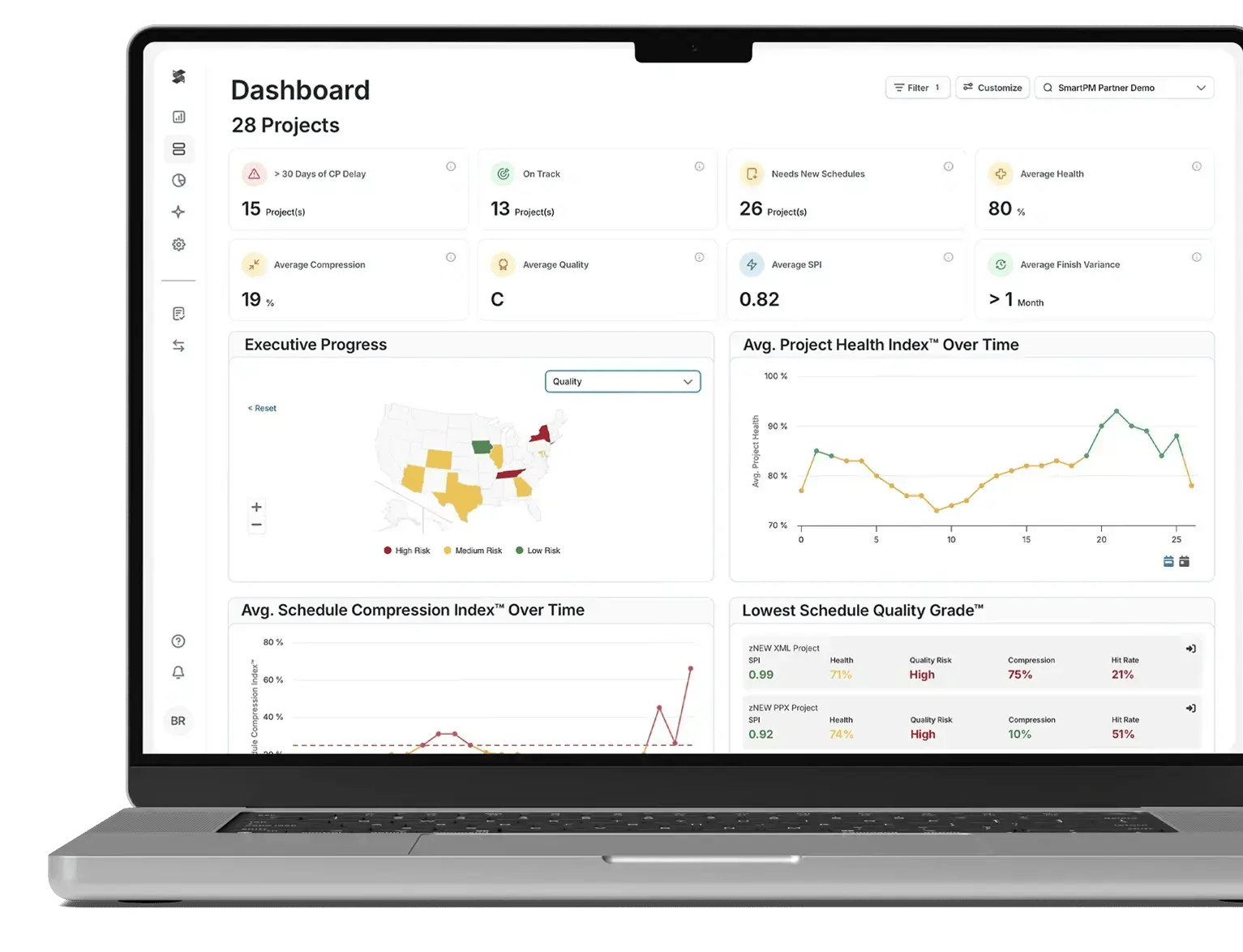
The costliest gap in most jobs is the lag between when a problem starts and when someone notices it. Hand-built analysis, exporting from P6 into Excel and eyeballing one update against the last, tends to happen monthly if that, and by then the slip is locked in.
Running the review automatically collapses that lag to minutes per upload, which moves a team off lagging indicators and onto leading ones.
Customers describe that shift in their own terms. Barton Malow Builders gained enough lead time to act on risk before it hardened into delay. Rowan Digital Infrastructure cut a reporting task from a full day to roughly five minutes. Columbia Ventures grounded a contract negotiation in verified schedule data instead of opinion, and Zachry Construction credited the depth of the analysis, saying no other tool looks at schedule data the same way.
For a broader look at how schedule data becomes management insight, see SmartPM's guide to construction analytics.
SmartPM is designed to sit on top of the tools you already use, including a portfolio-wide schedule visibility dashboard for leadership.
SmartPM offers two plans: SmartPM Essentials at 12,000 dollars per year for unlimited projects, and SmartPM Controls at 25,000 dollars per year with five control slots. Pricing is published and predictable, with no per-user-per-month surprises.
|
Pros |
Cons |
|
A proprietary CPM engine, rare among construction analytics tools based on publicly available documentation |
Controls tier requires a minimum five-project commitment, so it does not suit organizations running fewer active projects |
|
Forensic delay analysis built in, not an add-on |
The depth of Controls can exceed the immediate needs of teams very early in their controls journey, where Essentials is the right starting point |
|
FedRAMP High authorization for federal programs |
Not a schedule creation tool: you still build the schedule in P6, MS Project, or Phoenix |
|
Two tiers, from a mid-market entry point up to enterprise-grade depth |
|
|
Customer success team helps build the controls program, not just deploy software |
Capterra: 4.9 stars out of 5 (46 ratings)
Larry M. says: “I used SmartPM to communicate in an easy-to-understand method my client's schedules progress, concerns, and observations. I had a 2 year experience using SmartPM. I not only got a great tool to work with, but I got a great education on how a P6 schedule can really be used as a tool to manage a project. If I get another similar assignment, I be right back using SmartPM again”
Oracle Primavera P6 is the long-standing CPM scheduling tool many construction teams still build around. In this comparison, it is scored as a schedule creation platform rather than a schedule analytics layer.
P6 is strongest when the project schedule is complex, logic-heavy, and needs a mature CPM environment. It is not being evaluated here as a field planning tool or an automated analytics platform.
Best For: Complex and mega projects needing deep CPM scheduling.
Score: 74 / 100
Oracle Primavera P6 belongs in the schedule creation layer. It is the tool many teams use to build the master schedule that later gets analyzed, reported on, and compared against actual performance.
Asta Powerproject is a construction-focused scheduling tool for planners who want strong Gantt charts and 4D planning. In this review, it sits in the schedule creation layer.
Best For: Construction planners wanting strong Gantt charts and 4D.
Score: 68 / 100
Asta Powerproject is useful when the main requirement is to create and manage the project schedule visually, with construction planning workflows in mind.
Microsoft Project is a widely used project scheduling tool, especially for teams already standardized on the Microsoft ecosystem. It can support general project scheduling, but it is not the same as a dedicated construction schedule analytics platform.
Best For: Teams in the Microsoft ecosystem and general project scheduling.
Score: 64 / 100
Microsoft Project sits in the schedule creation layer for teams that want a familiar environment and do not need the depth of an enterprise CPM platform.
Phoenix Project Manager is a focused CPM scheduling tool for schedulers who want an affordable, dedicated scheduling environment.
Best For: Schedulers wanting an affordable, focused CPM tool.
Score: 63 / 100
Phoenix Project Manager sits in the schedule creation layer. It is most relevant for teams that want a practical CPM tool without taking on a broader enterprise platform.
Planera is a modern, collaborative CPM scheduling option for teams that want a more collaborative scheduling environment.
Best For: Teams wanting modern, collaborative CPM scheduling.
Score: 60 / 100
Planera sits in the schedule creation layer. Its best fit is for teams that want CPM planning with a more collaborative workflow.
ALICE Technologies is different from the traditional schedule creation tools in this list. It belongs in the AI optimization layer, where the goal is to model and compare scenarios before the team commits to a plan.
Best For: Preconstruction teams optimizing complex projects.
Score: 58 / 100
ALICE Technologies is best understood as a preconstruction optimization tool. It is built to generate and test schedule scenarios before committing to a project plan.
Smartsheet is a flexible work management tool, not a true CPM scheduling platform. It can help teams collaborate, manage tasks, and organize work, but it should not be confused with construction project scheduling software built around critical path logic.
Best For: Flexible, collaborative work management without CPM scheduling.
Score: 56 / 100
Smartsheet belongs in the general PM and work management layer. It is useful for collaboration and task tracking, but not for teams that need deep CPM schedule logic.
Outbuild focuses on field and short-interval planning. It helps translate the master schedule into the lookaheads and weekly work plans that field teams use to coordinate execution.
Best For: Field teams running lookaheads and weekly work plans.
Score: 52 / 100
Outbuild belongs in the field planning layer. It is not trying to replace the master CPM schedule or serve as the analytics engine above it. Its value is in helping field teams manage short-interval plans.
Construction scheduling is the process of planning the sequence, timing, and dependencies of every activity required to deliver a construction project, then tracking actual progress against that plan. A schedule built with the Critical Path Method maps activities, durations, and logic so teams can see which tasks drive the completion date and where float exists.
Construction scheduling software turns that from a static Gantt chart into a living model that updates as the job progresses. Done well, the schedule is the operating system of the project, not paperwork filed to satisfy the owner.
Across the construction industry, the project schedule is the backbone of delivery, and construction scheduling software is what keeps that project schedule honest as conditions change. Strong project plans connect scope, resources, and time, and good scheduling software keeps those project plans synchronized with what is happening in the field. The result is a project schedule that reflects reality, not just intent across the construction industry.
The baseline is the approved original plan against which all future progress is measured, and the logic is the network of task dependencies that defines what order the work must follow.
The quality of that logic determines whether the schedule is a real model or a wish list. Open ends, missing logic, and excessive constraints turn project plans into pretty pictures that cannot predict anything. Strong logic is what lets the critical path mean something.
Progress tracking compares planned versus actual at each update, producing measures like percent complete, schedule performance index, and accumulated delay. Without a disciplined update cadence, a team is flying blind between monthly reports, and by the time a slip is visible it is already expensive to recover. Performance measurement is where construction scheduling software earns its keep, because it converts raw updates into early-warning signals.
The critical path is the longest chain of dependent activities that sets the project finish date, and float is the slack non-critical activities carry before they start driving the end date. Watching how the critical path shifts from one update to the next is the single best early-warning signal in construction scheduling. When critical path analysis is automated, teams see the path move while there is still time to act, rather than discovering it in hindsight.
The best construction scheduling software is not the one with the longest feature list. It is the one whose features match how real construction teams plan, build, and report. Construction project management is not the same as task management, and the best construction scheduling tools reflect that.
Where general project management stops at task lists, construction scheduling tools model project timelines, dependencies, and the Gantt charts that show how project plans hold together. Project management for construction is, at its core, schedule management.
|
Feature Category |
Why It Matters |
What to Look For |
|
Gantt Charts and Calendar Views |
Project timelines, milestones, and task dependencies need to be legible to both schedulers and field crews |
Drag and drop editing, calendar views, and filters by trade or phase; advanced features should earn their place |
|
CPM and Critical Path Analysis |
The critical path determines which project tasks cannot afford to slip; a bar chart alone cannot show this |
True CPM engine that calculates the critical path, not just a visual display of activities |
|
Resource Management and Resource Scheduling |
Overbooking labor and equipment across multiple projects erodes margin and causes cascading delays |
Resource leveling, the ability to allocate resources across projects, and workload visibility |
|
Schedule and Cost Control |
A slip in the schedule is a cost event; tools that separate schedule management from cost management leave teams reacting instead of planning |
Integration between schedule management and cost management so impacts surface immediately |
|
Mobile App and Field Access |
Field teams cannot update schedules they cannot reach |
A capable mobile app with mobile access for real-time updates, issue flagging, and to adjust schedules from the jobsite |
|
Real-Time Collaboration and Automated Notifications |
Delays between field updates and office awareness are where small slips become expensive ones |
Two-way updates between field and office, with automated notifications that keep the entire team aligned on changes |
|
Progress Tracking and Reporting |
Planned-versus-actual analysis is the earliest warning signal in construction scheduling |
Configurable reporting that serves project managers, executives, and owners without manual rework at each update |
|
Integration Capabilities |
Disconnected tools create manual data entry, which creates errors and lag |
Native connections to P6, Procore, and other tools so schedule data flows automatically |
|
Schedule Quality Checks and Security |
A schedule that looks complete can still be analytically unsound; and schedule data is sensitive |
Automated quality checks against the DCMA 14-point check, plus enterprise-grade security for schedule files |
.png?width=3662&height=2463&name=Quality%20Grade%20Start%20to%20Finish%20and%20Start%20to%20Start%20(1).png)
The key benefits of construction scheduling software come down to seeing problems sooner and proving what happened. Used well, the right tool protects both the timeline and the margin.
Modern scheduling tools surface risk early, so teams fix problems before they cascade into the finish date.
Consistent templates and quality standards mean every project speaks the same language, which is hard to achieve with spreadsheets.
Catching schedule slippage early avoids the overtime, acceleration, and idle-resource costs that erode margin.
Leadership sees the health of every active project at a glance, not one project schedule at a time.
A clean update history and quality record support time extension claims and reduce dispute risk.
Shared, accurate data builds trust between owners and contractors, so decisions rest on facts rather than opinion.
Software alone does not create discipline. The construction teams that get the most from construction scheduling software wrap a simple, repeatable process around it.
Those habits build on a solid guide to construction scheduling, the sequencing, float, and update discipline that make any tool worth using.
Define what a good baseline looks like, including limits on open ends, constraints, and excessive durations, and check the schedule against the DCMA 14-point check before work begins. A schedule that starts with poor logic cannot be analyzed reliably later.
Move from monthly to weekly or biweekly updates wherever possible. The more often you update and analyze the schedule, the sooner you catch a slip, and the cheaper it is to recover.
Configure reporting for each audience so project managers, superintendents, executives, and owners each see what matters to them. A report no one reads is wasted effort, and one team member cannot interpret is worse.
Watch the schedule driving path not just per project but across every active job, so leadership can move attention to the project that needs it most. Portfolio-wide path analysis is where standardization pays off.
Every schedule update is a potential exhibit in a claim. Keep a clean, time-stamped history so the data can support a time extension or defend against one.
A mid-market GC does not need an enterprise controls team on day one. Start with a simple, well-run process and a tool that grows with you, then add depth as the program matures. Give team members a fast way to assign tasks, handle task assignments, and update progress from a mobile app, even before the full controls program exists.
Most construction teams have a schedule. Far fewer have confidence in it. The difference is in whether the schedule holds up as a diagnostic tool throughout the job, reliably answering whether the project is on track, where time has been lost, and what it will take to recover. Schedule quality is what separates a plan that runs the project from one that just documents it.
When schedule analysis happens by hand, tracking progress lands monthly at best, and by then delay is already baked into the job. The gap between when a problem develops and when anyone sees it is the single most expensive blind spot in construction scheduling. Tools that automate analysis close that gap by turning each update into a complete picture in minutes.
A schedule full of broken logic and hard constraints produces analysis you cannot trust, because garbage in means garbage out. The stakes are not small. McKinsey research found that construction labor productivity has grown only about 1 percent a year for two decades, well behind the wider economy, and that many projects suffer cost and time overruns. Schedule quality is one of the few levers a contractor controls directly.
When a project runs late and a dispute follows, you need defensible analysis: time-impact analysis, as-built versus as-planned, and a methodology that holds up. Recognized references such as the GAO Schedule Assessment Guide set out the best practices for a reliable, well-constructed schedule, and a tool that can produce a clean, day-for-day record turns a claim from a narrative into evidence.
Even the best construction scheduling software runs into predictable obstacles, and most have a clear fix. These are the construction scheduling challenges teams hit most often.
Different schedulers build schedules differently, so quality swings from job to job. Company-level quality standards and automated checks against the DCMA 14-point check bring every project schedule to the same bar.
Manual analysis in Excel can take days, by which point the insight is stale. Automating the review compresses it to minutes, so teams act on current data instead of last month's.
Most tools show one project at a time, which leaves leadership without a portfolio view. A schedule analytics layer surfaces health and risk across every active project in a single dashboard.
If updating the schedule is painful, field teams skip it. A capable mobile app and short-interval planning make updates fast enough that the field actually keeps the data current.
A schedule with no clean update history is useless in a dispute. Disciplined updates and an auditable record turn the schedule into defensible documentation.
The most important factor is whether the tool calculates or simply displays. A real CPM engine performs its own math on your schedule and catches issues a visualization layer never will. If a tool only reformats data from your scheduler into nicer charts, it cannot tell you whether the schedule is sound.
Decide whether you need schedule creation, field planning, analytics, or optimization, then match the tool to that layer. Most teams eventually run more than one, because no single management tool does all four well. Note that scheduling tools are not time tracking tools; if your real need is time tracking, that is a different category of software entirely.
Look for quality checks tied to the DCMA 14-point check and recognized standards. Without them, you have no objective way to know whether a schedule is reliable before you build a plan on it.
Even teams that never go to court benefit from forensic-grade delay analysis, because it shows exactly where time was lost. Confirm the tool can produce defensible, day-for-day analysis, not just a narrative.
The best construction scheduling software fits your stack rather than forcing a rip-and-replace. Check for native links to P6, Procore, and Autodesk so data flows automatically.
Compare the total cost honestly. Many general project management tools charge per user per month, and a per-user-per-month model can balloon as you add the entire team, so the headline price per user per month rarely reflects what you actually pay. A one-time license avoids a per-user per-month bill but comes with no ongoing support, and while some lightweight tools offer a free plan, dedicated scheduling tools and enterprise CPM scheduling software rarely include a free plan. For teams evaluating tools on a per user month basis, factor in how quickly seat counts climb as PMs, supers, and owners are added.
In the construction industry, project management and scheduling are inseparable, and the right tool depends on where your construction business sits today and where it is heading. Construction companies and the construction managers and construction professionals who run their projects do not all share the same construction scheduling needs, so match the tool to the work. A firm running a handful of jobs has different needs from one managing project timelines across dozens of construction projects at once, including large scale construction projects.
Keep schedule creation in MS Project or Phoenix, and add an entry-level analytics layer like SmartPM Essentials to grade quality and catch delays without a large controls team.
Pair P6 or Primavera Cloud for creation with a deep analytics platform like SmartPM Controls for forensic delay analysis and portfolio reporting.
That deeper tier works as construction schedule control software, layering delay detection, recovery tools, and portfolio visibility on top of whatever scheduler builds the plan.
Prioritize transparency and verification, using an analytics layer to confirm that contractor schedules are realistic and on track.
Security drives the decision; FedRAMP authorization and SOC 2 compliance are effectively prerequisites.
Use a tool like ALICE to stress-test and optimize the plan before committing, alongside your primary scheduling tool.
Add a short-interval planning tool like Outbuild so crews keep the schedule current from the jobsite.
They work together, and in practice no single management tool covers every layer. A mature construction scheduling stack usually pairs a creation tool such as P6, Microsoft Project, or Phoenix with a schedule analytics layer such as SmartPM, and often a field planning tool on top.
The creation tool builds the schedule, the analytics layer grades it and tracks performance, and the field tool keeps it current. The good news is that you do not need to choose between all the tools; the stack approach means each layer does its job. Because SmartPM sits on top of the others rather than replacing them, adopting it does not mean abandoning the scheduling software your team already knows.
See how SmartPM analyzes your existing P6 or MS Project schedule. Request a demo.

The matrix below shows how each tool scored across the eight factors. Scores are weighted toward schedule analytics and forensic depth, so schedule creation tools score lower by design, which reflects the framework rather than a judgment on their value for building schedules.
|
Factor (max) |
SmartPM |
P6 |
Asta |
MSP |
Phoenix |
Planera |
ALICE |
Smartsheet |
Outbuild |
|
Schedule Quality (20) |
19 |
13 |
12 |
11 |
12 |
10 |
9 |
5 |
6 |
|
Analytical Engine (15) |
14 |
13 |
12 |
11 |
12 |
11 |
12 |
6 |
8 |
|
Delay & Forensic (15) |
14 |
8 |
7 |
6 |
7 |
6 |
6 |
3 |
4 |
|
Portfolio & Reporting (10) |
9 |
8 |
7 |
7 |
5 |
6 |
6 |
8 |
6 |
|
Integration (10) |
9 |
10 |
8 |
9 |
8 |
8 |
8 |
9 |
8 |
|
Adoption & Time to Value (10) |
9 |
6 |
7 |
7 |
8 |
8 |
5 |
9 |
9 |
|
Security & Compliance (10) |
10 |
9 |
7 |
8 |
5 |
6 |
7 |
8 |
6 |
|
Value & Pricing (10) |
9 |
7 |
8 |
5 |
6 |
5 |
5 |
8 |
5 |
|
Total (100) |
93 |
74 |
68 |
64 |
63 |
60 |
58 |
56 |
52 |
SmartPM leads because the framework rewards an independent CPM engine, automated quality grading, and forensic delay analysis, which is exactly the analytics layer it was built to serve. P6 scores well on engine depth and integration but lower on automated analytics and forensics, consistent with its role as a schedule creation tool. Field, optimization, and general work management tools score lower still on analytics criteria, which says nothing about how well they do their own jobs.
The best construction scheduling software is the one that fits the layer you are solving for. P6, Phoenix, Asta, and Planera build the schedule. Outbuild keeps it current in the field. ALICE optimizes it before you commit. SmartPM sits on top of whatever you build and tells you whether the schedule is sound and whether your construction projects are actually tracking to it.
The teams that manage schedules well are the ones who treat each update as a diagnostic, and do not look for one tool to do everything. They build a stack where each layer does its job, and they pair their scheduling software with an analytics layer so problems show up while there is still time to act.
See how SmartPM grades your schedule and flags delay risk on your own projects. Book a demo.