
Construction Submittals: What They Are and Why They Matter
In any construction project, one process that can directly impact success is the management of construction submittals. These documents are essential for...
Blog
SmartPM now reads your Forma Build RFIs and submittals against the schedule, so the ones that matter don’t hide in a flat list.

Every job runs on two clocks. The first is the schedule — the plan everyone signed up for. The second is the stack of open RFIs and submittals sitting in Forma Build, quietly deciding whether that plan survives the month. Most teams read the first clock every morning and the second one by feel.
SmartPM now pulls RFI and submittal data directly from Forma Build™ and Forma Data Management™, part of the Autodesk® Forma industry cloud, and reads it against your schedule. A purpose-built AI agent connects each open RFI and submittal to the specific schedule activities that stand to be impacted if it doesn’t get a timely response. No exports. No re-keying. No spreadsheet going stale between two systems that never talk.
That gap has a price tag whether you’re tracking it or not. A widely cited analysis by the Navigant Construction Forum, which reviewed more than a million RFIs across 1,362 projects, put the average cost to process a single RFI at over $1,000 — with roughly one in five never receiving a formal answer at all. When one of those sits on the critical path, the clock doesn’t stop: general conditions keep running until it moves, while everyone waits on an answer.
For most teams, RFIs and submittals live in one system and the schedule lives in another. You track them in parallel, eyeball which ones feel urgent, and hope the ones you set aside weren’t sitting on the critical path — or creeping toward it. That works right up until it doesn’t — usually about the time a routine turnaround resurfaces as a delay nobody saw coming.
The other option is to be an overachiever about it: build the RFIs and submittals into the schedule as their own activities, line by line. On paper it’s the rigorous choice. In practice it costs more than anyone cares to budget. Somebody has to decide which items make the cut, because nobody is adding all of them — which usually means falling back on whatever the industry considers notorious for running late. Somebody has to build the activities. Then somebody has to update them, every cycle, for the life of the job.
I scheduled a $500 million hospital where several hundred activities were nothing but submittals and RFIs. Who owned that update? Me, most days — the PM and PE had their own fires to put out. Multiply those hours by a loaded rate and the number stops being funny. What we had built was not visibility. It was schedule fatigue with a Gantt chart attached.
Trying to force every submittal into the schedule was a losing game — it was safer to plan for the schedule to be wrong than to expect reality to match it. My activity count would practically double just from tracking iterative cycles like "revised or rejected submittal #4." Half the time, there was no real status to report, so everything defaulted to "on time" by proxy. That’s the kind of tedious, high-overhead work that needs a dedicated scheduler, because nobody else will touch it.
RFIs and submittals don’t need to be rebuilt as schedule activities. They need to be read against the ones they touch — which is what the integration does. Connect a Forma Build project once and you get:
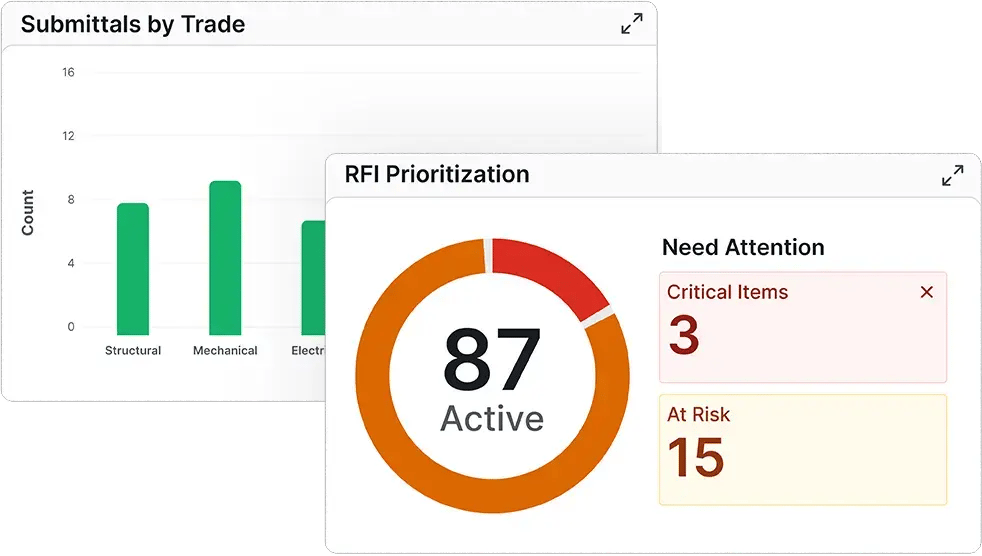
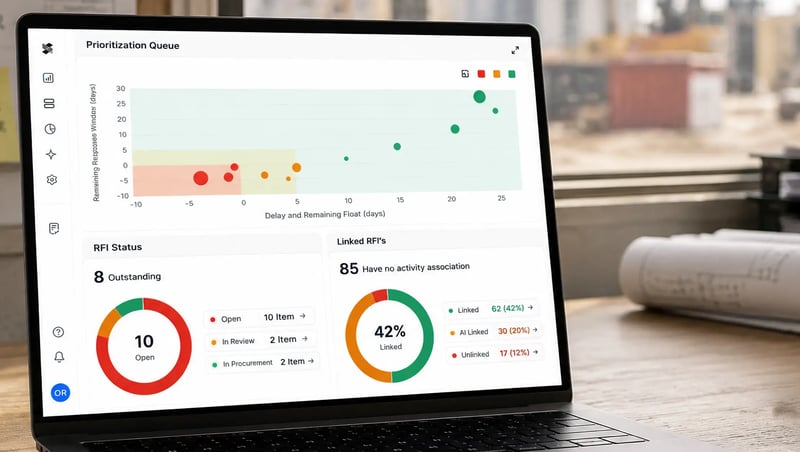
I used to keep a running list in my head of which open items actually scared me — every scheduler does. This is the part that changes how the day goes. Any system can hand you a list of open RFIs. A flat list is a smoke detector that beeps at the same volume for burnt toast and a kitchen fire. It never answers the only question that matters: if this one slips, does it hurt me, and when?
SmartPM answers it. Because every RFI and submittal is tied to real schedule activities, you can see which open items are consuming float, how much runway is left before they start pushing work, and how far downstream the effect reaches. An RFI blocking a non-critical activity with three weeks of float is a different problem than one sitting with two days of float before it’s on the critical path and potentially causing a day-for-day delay. That usually means paying to expedite it. On your screen, they no longer look the same.
The same link still pays off after the fact. If a delay does happen, you're not starting from zero — the link between an RFI or submittal and its activity surfaces the priority contacts tied to it, so the PM knows exactly who to call to get a material delivery moved to a workable date instead of losing time just to track down the right people.
What your team gets out of it:
This is not a scheduling bolt-on. RFIs and submittals are one more stream feeding SmartPM’s project intelligence platform — schedule, document, field, safety, trade, and future cost data working together so the things that genuinely put a project at risk surface early, in language anyone on the team can act on. This is the first data stream we’re bringing in from Forma Build, not the last — expect more of your project data flowing between SmartPM over time.
Anyone running a project in Forma Build has a reason to be here — though not the same reason:
I spent years being the human version of that sync, carrying both clocks in my head and hoping I’d cross-referenced them right. Two clocks, one reading. The schedule already knows when the work has to happen. Forma Build already knows what’s still open. Put them side by side and the items that can actually hurt you stop hiding in the middle of a list.
Request a demo to see how SmartPM grades your baseline and every update against it. Book a demo.
Autodesk, Forma Build, and Forma Data Management are registered trademarks or trademarks of Autodesk, Inc., and/or its subsidiaries and/or affiliates in the USA and/or other countries. All other brand names, product names, or trademarks belong to their respective holders.