









Essentials

See what your schedule isn’t telling you

SmartPM Essentials makes risk, quality, and performance clear across every project – before small problems snowball into big delays.

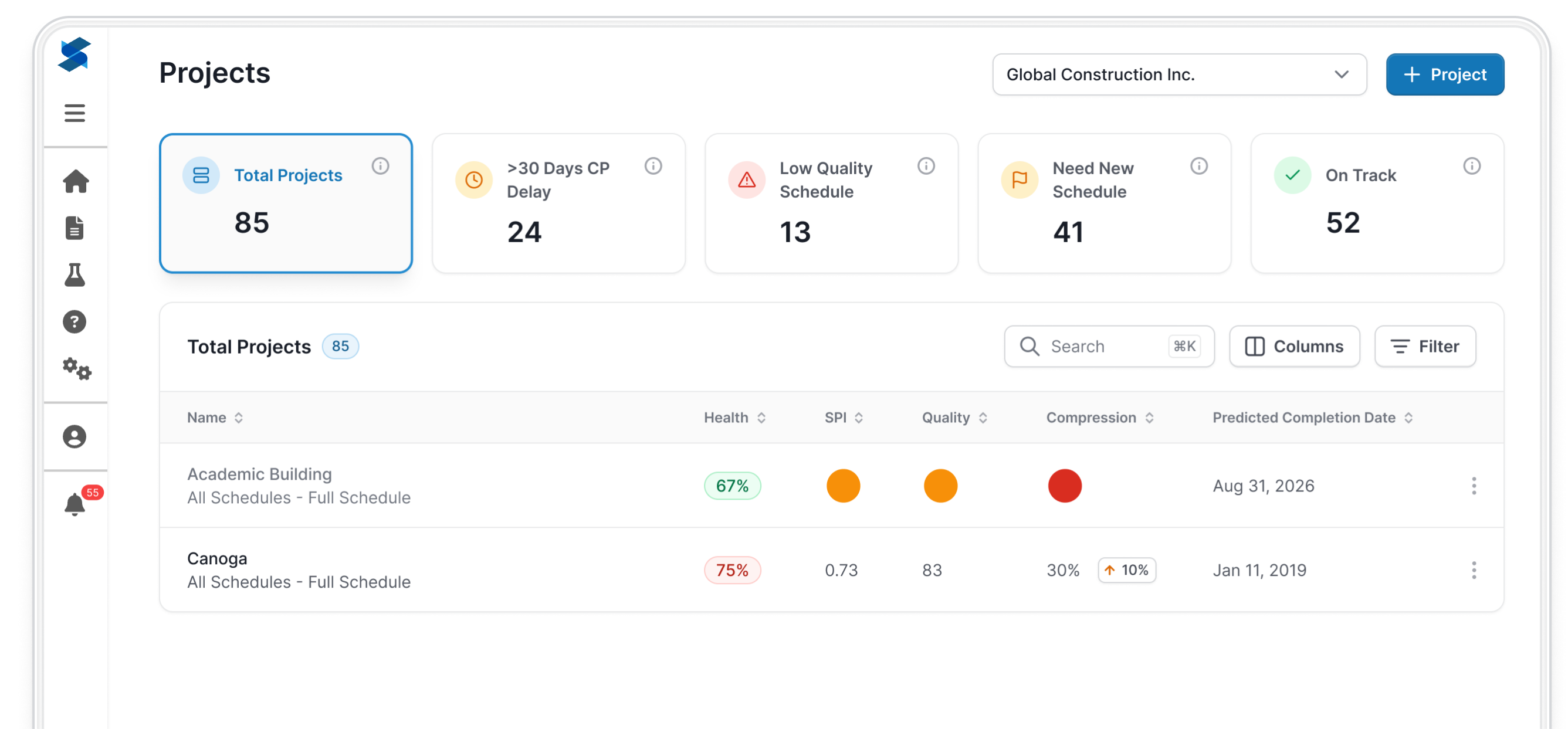
Essentials Projects dashboard showing five summary cards (Total Projects 85, >30 Days CP Delay 24, Low Quality Schedule 13, Need New Schedule 41, On Track 52) above a searchable, filterable projects table with health, SPI, quality, compression, and predicted completion date columns.
essentials-mobile-header

Trusted by Contractors and Owners Across the Globe

What is Essentials?

Simplified Schedule Intelligence

Gain complete visibility into all your projects with a standardized way to review and analyze schedules.

  • Every project covered: From proposals to closeout, all schedules live in one repository.
  • Everyone included: PMs, Supers, Execs, and Schedulers see the same signals with no seat math.
  • Every update consistent: Automated checks and trends keep reviews objective and repeatable.

Simple to roll out, easy to use, and built to scale across your company. 

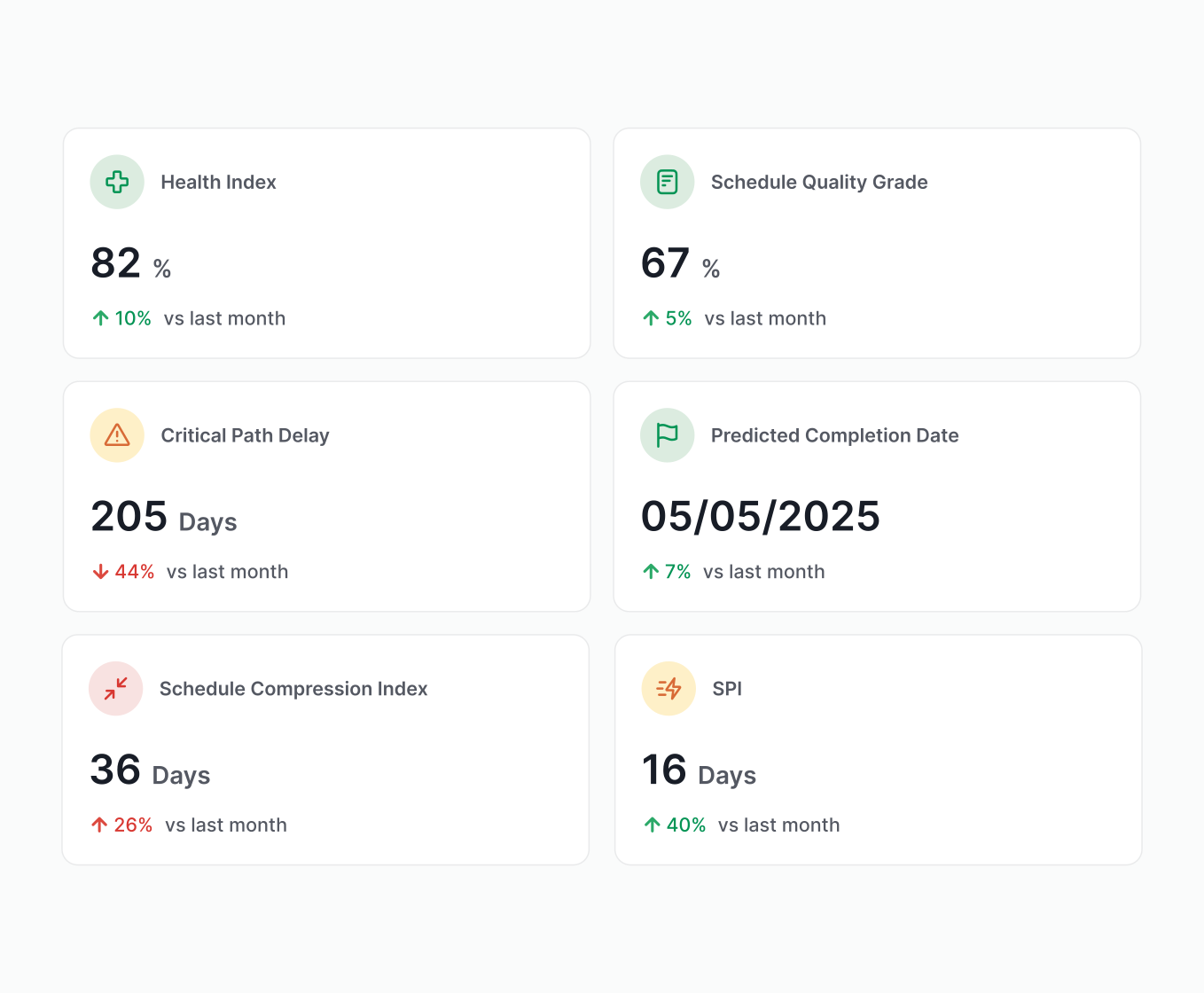
Dashboard grid of six cards: Health Index 82% (up 10%), Schedule Quality Grade 67% (up 5%), Critical Path Delay 205 days (down 44%), Predicted Completion Date 05/05/2025 (up 7%), Schedule Compression Index 36 days (up 26%), and SPI 16 days (up 40%).

Integrations

Works with the schedules you already have

Different tools? No problem. Upload .xer, .xml, .mpp, or .ppx files. Essentials analyzes them instantly while keeping a clean history and a single source of truth.
  • microsoft-project-file-icon-r
  • p6-xer-project-file-icon-r
  • p6-xml-project-file-icon-r
  • asta-power-project-file-icon-r
  • phoneix-project-file-icon-r

One view of every project. Zero blind spots.

One place for all of your active projects. Filter by risk, region, or status – and know which projects need focus.

  • Prioritize the jobs that need attention
  • Standardize oversight across the portfolio
  • Trust your end date throughout construction
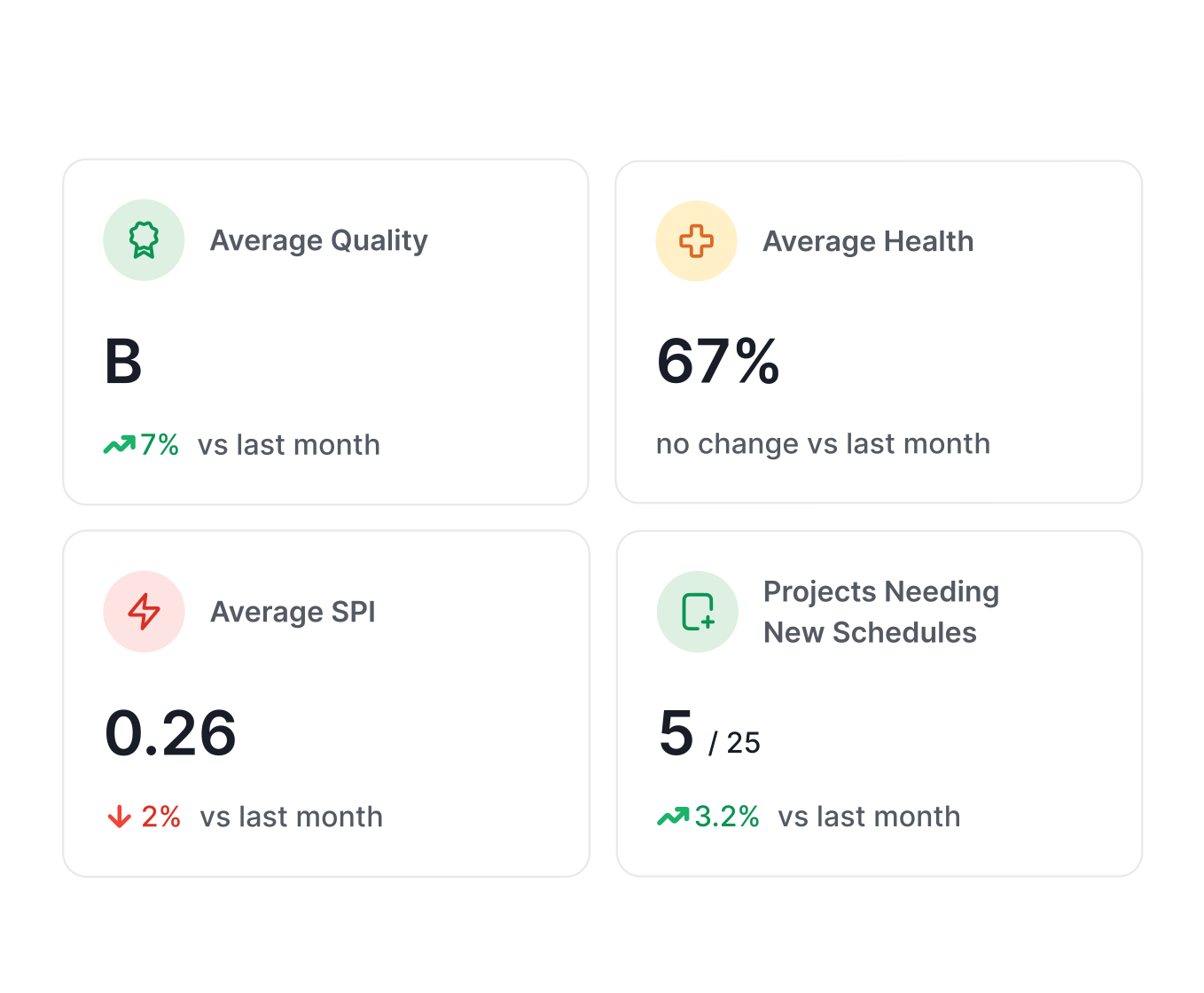
Dashboard-style grid of four cards: Average Quality B (up 7%), Average Health 67% (no change), Average SPI 0.26 (down 2%), and Projects Needing New Schedules 5/25 (up 3.2%).
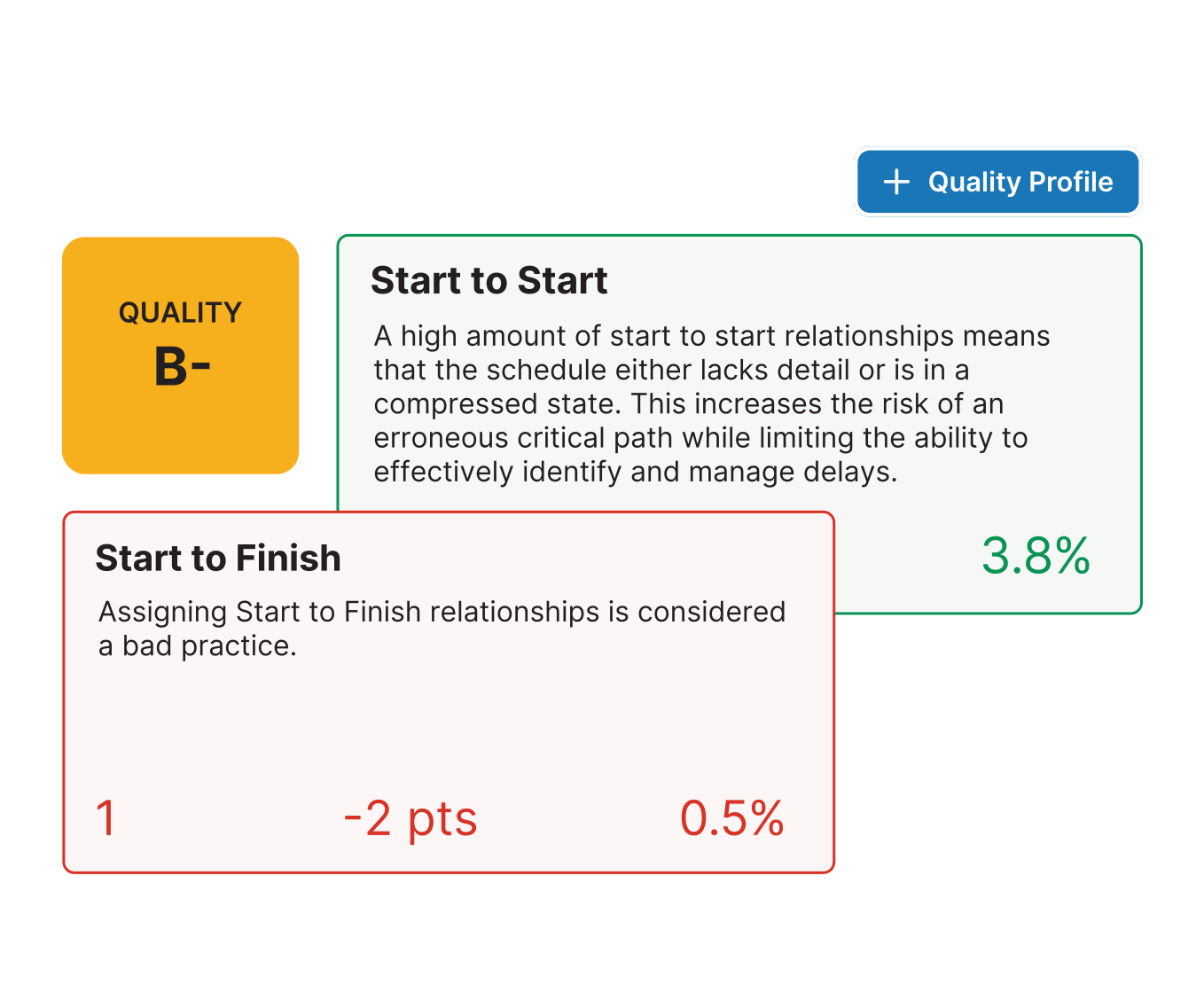
Quality analysis view showing an overall Quality grade of B- with two relationship checks: Start to Start flagged at 3.8% and Start to Finish flagged as bad practice with 1 occurrence, -2 points, and 0.5%.

Catch problems before they cause delays

Every schedule upload is automatically scanned against 40+ industry checks. Essentials applies the same analysis to every upload with custom quality profiles you control.

  • One standard across every job or scheduler
  • Objective grading with activity-level to do's
  • No more surprises buried in updates

Know what changed & why it matters

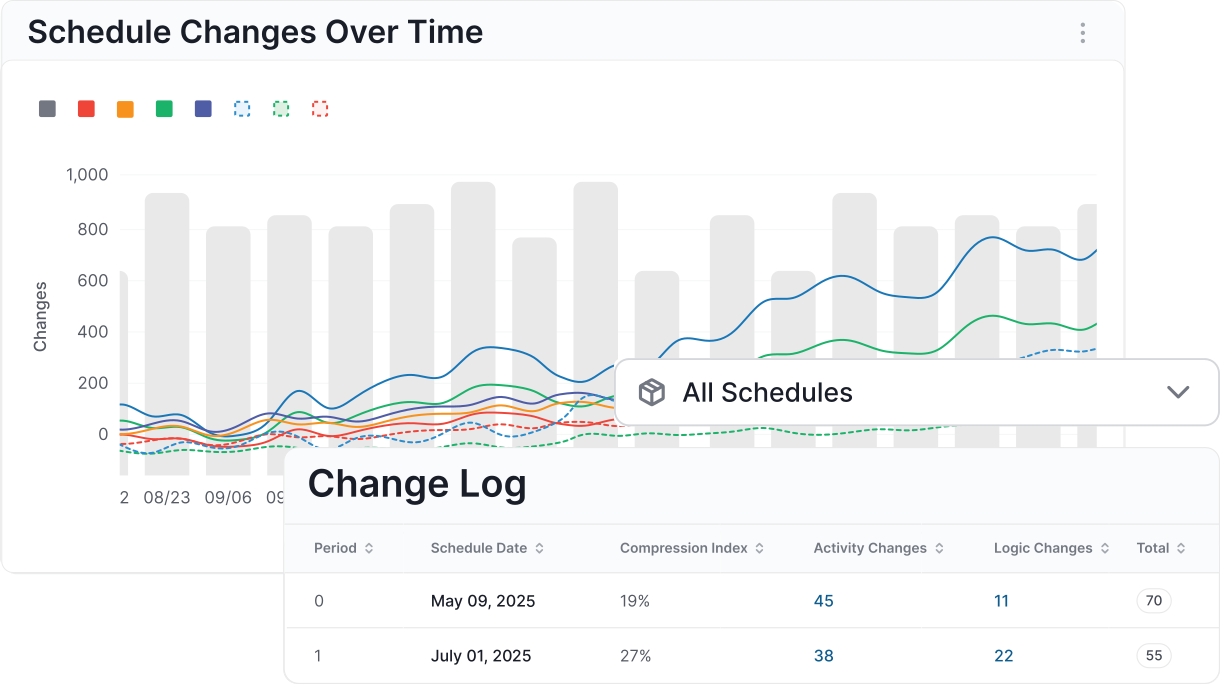
Forget manual markups. Essentials logs every change to the critical path, logic, durations, and more in seconds.

  • Spot risky changes before you commit
  • Build accountability into every update cycle
  • Get instant answers on exactly how every activity changed
Schedule Changes Over Time chart with multiple trend lines and bars, plus a filter set to 'All Schedules' above a Change Log table listing periods, schedule dates, compression index, activity changes, and logic changes.
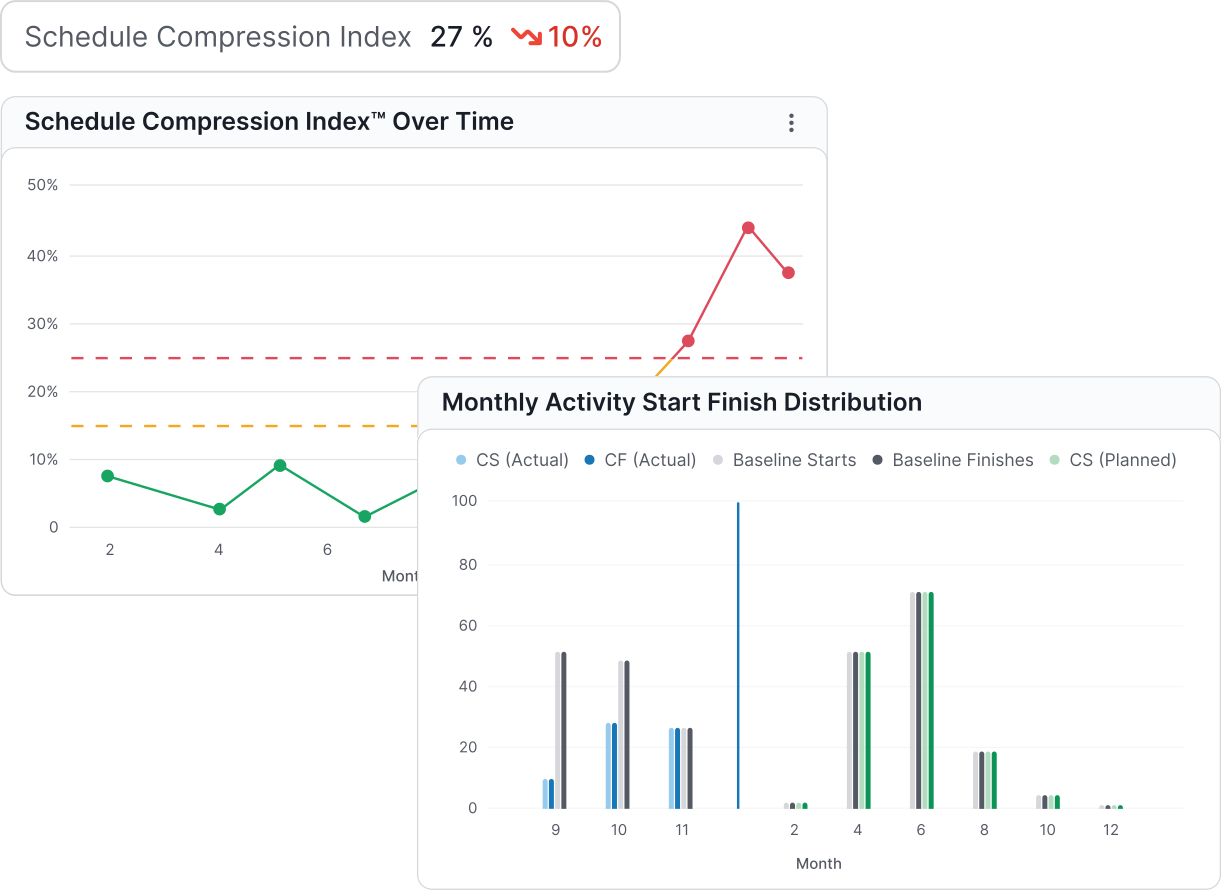
Two analytics charts: 'Schedule Compression Index Over Time' line chart with thresholds and a 'Monthly Activity Start Finish Distribution' bar chart comparing actual vs baseline and planned starts/finishes.

Track risk over time

See if projects are slipping, compressing, or trending toward delay. Essentials surfaces leading indicators across all jobs.

  • SPI, compression, delay signals, and more
  • Quality grades and health scores over time
  • One language for risk across teams and projects

Integrations

Works with the schedules you already have

Different tools? No problem. Upload .xer, .xml, .mpp, or .ppx files. Essentials analyzes them instantly while keeping a clean history and a single source of truth.
 
schedule-quality-icon_1

Schedule Quality Checks

Flags logic gaps, excessive float, long durations, and risky sequencing.

core-analytics-icon

Schedule Quality Report

Spot exactly which activities are driving your grade down and need correction.

schedule-comparison-tool-icon2

Schedule Comparison Tool

Compare any schedule updates to see what changed between them.

performance-trends-icon

Performance Trends

Track how key metrics evolve over time to spot patterns and emerging risks early.

milestone-tracking-icon_1

Core Analytics

Birds-eye view of overall project health and progress trends.

delay-analysis-icon

Change Log

Monitor and understand what changes affected critical activities, logic, and durations.

Take their word for it

“If your company wants to leverage data-driven, decision-making processes, and needs true insights into what’s really happening with the schedules on their projects, SmartPM is the product I would recommend.”

Denton Perreault (DesCor Builders)
Denton Perreault DesCor Builders
Take their word for it

“Incredible Schedule Analytics Tool. SmartPM is super easy to learn and very effective when trying to communicate what is going on in the schedule. It is so quick and easy to upload your schedules into the software and within minutes have all of the metrics at your fingertips.”

Brandon Howell (Layton)
Brandon Howell Layton
Take their word for it

“Some metrics we looked at in the past were lagging indicators. SmartPM provides leading indicators that give us time to adjust early and with more confidence.”

Take their word for it

“SmartPM did everything we needed it to do and more. It allows us to identify potential roadblocks in our schedule – and do it early enough to remediate the issues.”

Take their word for it

“Information to our owners is now 10X greater than before we had SmartPM. We uncovered a lot of risks that we did not know we had.

Shane Tresch (Bell Construction)
Shane Tresch Bell Construction
Take their word for it
“The dashboard is easy at a glance. You can see health, compression, and the real end date in a single view.”​​
Take their word for it
“The Windows Analysis is a game changer. What used to take me weeks or months on some projects now takes minutes or hours. I don't want to analyze any project without SmartPM anymore.”

Take their word for it
“SmartPM’s interface was superior versus the competition, with essential metrics and reports clearly displayed and easy to find.”

Rob McMurrich (J.H. Findorff)
Rob McMurrich J.H. Findorff
Take their word for it
“SmartPM is really helping us find and deal with the flaws in our baseline schedules and weekly updated schedules. It is saving us a lot of time by providing a cheat sheet on any issues with the schedule and points us right to the issue at hand instead of having to go dig for it.”
Brandon Schroer (DesCor Builders)
Brandon Schroer DesCor Builders
Take their word for it

“The integration between SmartPM and Procore is huge for us because we don’t have to reinvent the wheel. We just add SmartPM into our current process to supplement it rather than change it.”